Caspio Store Locator App: Help Your Customers Find You
May 17, 2016

Does your business operate on multiple locations? If yes, your customers are probably looking for your store or operation center nearest to them. However, is it easy for them to find your locations?
Though they can search on Google or Google maps, it is likely that they may come across your competitors and miss the opportunity to locate you. Have you given them a tool to specifically find you?
You can make it easy for your customers to find your locations, see them on a map, get directions, or see operating hours – all in one interactive page on your website. Let’s help them find you.
Caspio offers ready-made apps that come free with your Caspio account. The Caspio Store Locator App is one of them. All you have to do is to load the database with your locations and deploy the public facing pages of the Store Locator app on your website.
This online database app is essentially a turnkey solution for businesses with multiple locations. It utilizes Caspio’s distance search capability to help users find your location nearest to them. It provides an intuitive user interface and is already integrated with Google maps. Users find nearby locations of any address-centric data in your database. You can use the app exactly as it is or customize it based on your precise needs and seamlessly embed it on your own website.
Caspio Store Locator App Features
The Caspio Store Locator app offers comprehensive set of web tools and provides powerful capabilities that includes:
- Add unlimited number of business locations
- Users can filter and sort results based on proximity
- Fully-customizable fields, labels, colors, icons, map features, etc.
- All user searches are logged for your business intelligence & analytics use
- Existing location data can be geocoded through our geocoding service
- Simply copy and paste the deploy code and embed on your own website
- Supports any web host, blog software or CMS
- Mobile friendly – works on any device
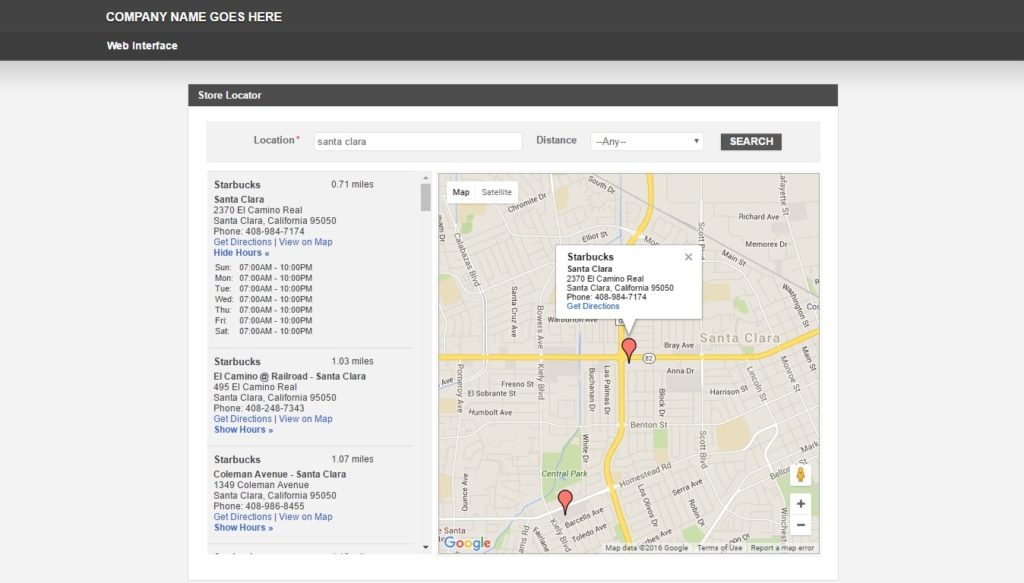
Here’s How to Get the Caspio Store Locator App
1. Request the Store Locator app to be loaded into your account.
You must first submit an app request. Upon submission, our Support team will contact you once the template has been loaded into your account.
2. Ensure that your plan includes Distance Search.
The Distance Search feature allows users to find and display records based on their nearest location.
3. Deploy the app on your website.
Caspio offers several deployment methods. You can embed your app in any website, display it inside an HTML frame, or use in SharePoint and other .NET sites.
To learn more or to request the Store Locator app, click here. Don’t have a Caspio account yet? Get started by simply signing up for a free trial account.


Recommended Articles

Best Bolt.new Alternatives for Business Apps (2026)
READ STORY
Online Database With a SQL Backend: 7 Questions to Ask
READ STORY
9 Vibe Coding Security Risks in AI-Generated Apps
READ STORY
Build Custom Business Apps Easily: 3 Patterns
READ STORY
Caspio AI Connector Extensions: 5 Jobs for Your Tables
READ STORY
PHI and Caspio AI: Which Features Your BAA Covers
READ STORY
How AI Agents Buy Software, and Why Legibility Wins
READ STORY
Build Internal Tools With AI: Best Tools for Business (2026)
READ STORY
10 Questions to Ask Before Connecting AI to Business Data
READ STORY
Add a Role-Aware AI Chat Agent to Your Caspio App
READ STORY
Lovable Alternatives for Business and Regulated Apps (2026)
READ STORY
Vibe Coding vs. Low-Code: Key Differences and Where Caspio Fits in 2026
READ STORY
