July 15, 2026
Database Design Best Practices: A Practical Guide for Business Applications
July 15, 2026

Database design best practices include modeling each real-world entity as its own table, assigning every record a unique primary key, connecting tables through relationships instead of duplicating data, choosing the right data type for every field, and normalizing data to eliminate redundancy. A no-code platform like Caspio lets you apply all of these principles without writing SQL, on a real Microsoft SQL Server backbone.
Good database design is not academic theory reserved for engineers. It is a practical set of principles that any business builder can learn and apply. Get them right, and your application scales cleanly, reports accurately, and adapts as requirements evolve. Get them wrong, and you’ll spend more time fixing data issues than building value. This guide explains the core principles in plain language, follows a business example throughout, and shows how to apply each one point-and-click in Caspio.
Overview of Database Design Best Practices
The core best practices are consistent across virtually every well-designed database:
- One table per entity. Each table should represent one type of information, such as customers, orders, or products.
- A unique primary key per record. Every row needs a value that uniquely identifies it.
- Relationships instead of duplicated data. Link tables with foreign keys rather than copying the same information in multiple places.
- The right data type per field. Numbers as numbers, dates as dates, and currency as currency.
- Normalization. Store each fact once, in one place, and connect related data through relationships.
- Data integrity rules. Require key fields, limit entries to valid values, and maintain valid relationships between records.
Apply these principles and you have a database that functions as a reliable system of record. Skip them and data quality, reporting, and maintenance become increasingly difficult as your application grows.
The rest of this guide explains each principle, highlights common mistakes, and demonstrates how a non-developer can apply them in Caspio without writing SQL.
What Is Database Design?
Database design is the process of deciding how to structure your data: what tables you need, what fields each table holds, what data type each field uses, how the tables relate to one another, and how to keep the data accurate and consistent. Good design stores each fact once, connects related data through relationships rather than duplication, and supports the reports, searches, and workflows your application requires.
Database design happens before and throughout application development. The forms users complete, the search screens they use, and the reports they rely on all sit on top of the underlying data structure. Design that structure well and everything built on top of it is easier to develop, maintain, and scale.
Best for: Business builders, ops leaders, and citizen developers planning a database-backed application who want to structure their data correctly before building, without a computer science background. The concepts in this guide can be applied point-and-click in Caspio on a relational platform that supports unlimited users, fully hosted standalone apps or embeddable components, and a SOC 2 Type II attestation renewed by annual independent audits alongside a HIPAA-compliant environment. Try it free for 14 days.
Why Good Database Design Matters
Bad data is expensive. Gartner estimates that poor data quality costs organizations an average of $12.9 million per year. Much of that cost starts at the structure level, with systems that were never designed to keep data accurate, consistent, and trustworthy in the first place.
Sound design pays off in concrete ways. A well-structured relational database:
- Scales as records and users grow, without slowing to a crawl.
- Reports accurately, because each fact lives in exactly one place and is never out of sync with itself.
- Supports many concurrent users safely, without the version conflicts and overwrites that plague shared files.
- Is easier and less expensive to extend, because you can add fields and tables without rebuilding what already exists.
Poor design produces the opposite: duplicate data, reports that disagree with each other, corruption when two people edit at once, and expensive rework every time the business changes.
The Spreadsheet-as-Database Trap
The most common design mistake is not a subtle one: using a spreadsheet as a database.
Spreadsheets are universally familiar and require no setup, which is exactly why teams reach for them. But spreadsheets have no built-in concept of primary keys, foreign keys, referential integrity, or many of the other mechanisms that keep relational data accurate and connected.
As soon as you have repeated data, multiple editors, or relationships between records, the cracks begin to show: information gets duplicated and falls out of sync, concurrent edits create version-control headaches, reporting becomes less reliable, and access control and auditability are limited.
A spreadsheet is often a great place to start, but it’s rarely the right place to stay.
Step by Step: 9 Database Design Best Practices
The following steps walk through the core principles of database design. Each section explains the concept using a business example, then shows how to apply it in Caspio.
We will carry one example throughout: a simple order-management system with Customers, Orders, Products, and Order Items. It is small enough to follow and rich enough to show both major relationship types.
-
Start by Modeling the Real World (entities, attributes, relationships)
Before you open any tool, identify the entities you track. Entities are the nouns of your business: customers, orders, products, cases, assets, projects. For each entity, list its attributes (a customer has a name, email, and address) and note how entities relate to each other (a customer places orders; an order contains products).
This process is called conceptual data modeling, and it is often the most valuable time invested in a project. It is far easier to move a box on paper than to restructure live data later.
In our example, the entities are Customers, Orders, Products, and the line items that connect orders to products.
In Caspio: You design this structure visually. Caspio’s AI Assistant (in the Flex framework) can generate an entire starting schema, including the tables and relationships you need, from a plain-language description of what you track, giving you a first draft to review and refine. Try Caspio free.
-
Use One Table Per Entity, One Row Per Record
Each entity becomes its own table, and each row represents one instance of that entity. One row per customer in Customers, one row per order in Orders, one row per product in Products.
Do not mix entities in a single table, and do not spread one entity across several tables for no reason. The test is simple: if you find yourself repeating the same block of information down many rows, that repeated block is probably a separate entity that deserves its own table.
In Caspio: You create a table for each entity point-and-click in the Tables section, then define its fields in Table Design. No SQL or schema script required.
-
Give Every Record a Unique Primary Key
A primary key is a field whose value uniquely identifies each row, is never empty, and is never duplicated. It is how the database distinguishes one record from another, and how related tables refer to that record. Names make poor primary keys because multiple customers can share the same name. A dedicated ID field is the standard approach, and auto-incrementing integers are the common practical choice.
In Caspio: Use an Autonumber field, an automatically assigned ID that increments by 1 for each new record. Caspio’s Autonumber, Prefixed Autonumber, Random ID, and GUID data types are always unique, which makes any of them a suitable primary-key choice. Each table in our example gets its own key: CustomerID, OrderID, and ProductID.
-
Connect Tables With Relationships Instead of Duplicating Data
This is the heart of relational database design. Instead of copying a customer’s full details onto every order, you store the customer once in Customers and place only the CustomerID on each order.
That CustomerID is a foreign key: a field in one table that references the primary key of another table, creating the relationship. Change the customer’s address once, and every order reflects it automatically, because the address was never duplicated.
One-to-many is the most common relationship type. One parent record relates to many child records, while each child relates to only one parent. One customer has many orders; each order belongs to one customer. Caspio describes it similarly: each record in the parent table relates to one or more records in the child table, while each record in the child table relates to one record in the parent table.
Many-to-many relationships occur when records on both sides can relate to many records on the other side. Orders and Products are many-to-many: an order can contain many products, and a product can appear on many orders. You do not model this relationship with a single shared field. The relationally correct answer is a junction table (also called a join table): an Order Items table that holds one row per order-and-product pairing, typically including OrderID, ProductID, and Quantity. The many-to-many relationship becomes two one-to-many relationships connected through the junction table.
Watch the video below to learn how to create effective database relationships.

In Caspio: Relationships are created by associating a field in one table with a field in another. Caspio provides a visual relationship designer, opened from the Tables listing via the Relationships button, where tables appear as cards and can be connected visually or through a New Relationship dialog (Parent Table and Field, Related Table and Field, plus a join type). Caspio implements many-to-many relationships through a junction table, following the same relational design principles used by traditional database management systems. Want to try it for yourself? Start a free 14-day trial.
A note on Caspio’s List data types: They allow multiple values to be stored in a single field, which can be useful for simple tags or checkbox selections. However, they are not the correct way to model a true many-to-many relationship. For that, use a junction table.
-
Choose the Right Data Type for Every Field
Every field should use the data type that matches the kind of value it holds. Numbers used in calculations should be numbers, money should be currency, dates should be dates, and yes/no answers should use a Boolean data type. Correct types enforce validation at the source, enable correct sorting and math, and prevent classic errors like a ZIP code losing its leading zero or a date being stored as plain text that will not sort.
In Caspio: You pick a data type for each field in Table Design. The set includes Text (255) and Text (64000) for strings, Number for decimals used in calculations, Integer for whole numbers (which Caspio notes can be used as IDs and in relationships), Currency for money, Date/Time and Timestamp for dates, Yes/No for Boolean values, File for attachments, Password (always encrypted), and Formula for calculated fields. In our example: Product Price uses Currency, Order Date uses Date/Time, primary keys use Autonumber, and foreign keys use Integer.
-
Normalize to Remove Redundancy (Without Over-Engineering)
Normalization sounds academic, but the practical idea is simple: store each fact once, in one place, then connect related data through relationships. If a customer’s address appears on every order, you have redundancy. The day that customer moves, you must update multiple records and risk inconsistencies. Store the address in Customers instead, reference the customer from Orders, and the information exists in only one place.
The formal normalization levels are simply labels for degrees of this discipline:
- First normal form (1NF): Atomic values only, with no repeating groups. Do not store “Product1, Product2, Product3” in a single cell.
- Second normal form (2NF): No field depends on only part of a composite key.
- Third normal form (3NF): No field depends on a non-key field. Store the customer’s address in Customers rather than repeating it on every order.
For most business applications, 3NF is the practical target. Do not over-normalize. If you split your data into so many tables that every simple question needs a dozen joins, you may have traded one problem for another and hurt both usability and performance. Stop at “each fact stored once.”
In Caspio: Splitting Customers, Orders, Products, and Order Items into separate related tables is normalization in practice. Caspio Views, which are virtual tables that combine data from multiple tables without duplicating it, let you present the combined picture (a customer with their orders and the products on them) for reporting, while the underlying data stays normalized and stored once.
-
Enforce Data Integrity and Validation
A well-structured database also protects itself from bad data. Data integrity means requiring the fields that must be present, restricting fields to valid values, keeping formats consistent, and enforcing referential integrity so that foreign keys always point to valid parent records. Referential integrity prevents situations such as creating an order for a customer who does not exist, or orphaning order items when an order is deleted.
In Caspio: Required fields, valid-value restrictions and other validation rules can be configured point-and-click in table design and on forms. Referential integrity can also be configured on relationships to help maintain consistency between related tables.
-
Design for the Reports and Searches You Will Need
Design is not only about storing data; it is about answering questions. Before finalizing the structure, identify the reports, searches, and dashboards your users will actually need. Which fields will they filter by? What information will they group, summarize, or total? Designing with those questions in mind tells you which fields matter, which keys you need, and how tables should relate to one another. A design that ignores how the data will be consumed is often difficult to query later.
In Caspio: Views let you pre-join the tables behind a common question, and the reports, search forms, and charts you build on top are embeddable apps and components that read directly from that well-designed structure.
-
Name Consistently and Design to Evolve
Finally, establish naming conventions and design for change. Choose a consistent approach for table and field names. Decide whether names should be singular or plural, avoid unnecessary spaces, and keep naming predictable. Good naming conventions serve as documentation that remains useful over time.
Additionally, assume the business will evolve. A sound relational design allows you to add to it without disrupting what already exists because each entity is cleanly separated and connected through well-defined relationships. Build on a sound design from the start, and future changes become extensions rather than rebuilds.
Common Database Design Mistakes to Avoid
The fastest way to a good database design is to avoid the predictable mistakes that cause problems later on. Each one has a straightforward fix:
| Mistake | Fix |
|---|---|
| Treating a spreadsheet as a database | Use a real relational database with tables, keys, and relationships. |
| One giant table for everything | Split into one table per entity and relate them appropriately. |
| No primary key | Give every table a unique key; an autonumber ID is usually the simplest option. |
| Duplicating data across tables | Store each fact once and connect records with foreign keys. |
| Wrong data types | Set the correct data type per field from the start. |
| Over-normalizing into unusable fragments, or under-normalizing so data repeats everywhere | Aim for each fact stored once (typically around 3NF) without creating unnecessary complexity. |
| Designing around screens instead of data | Model entities and relationships first, then build forms, reports, and dashboards on top. |
| No data integrity rules | Require key fields, restrict entries to valid values, and enforce referential integrity. |
How to Apply These Best Practices Without Code in Caspio
Here is the entire process applied to our order-management example in Caspio, using a point-and-click approach throughout.
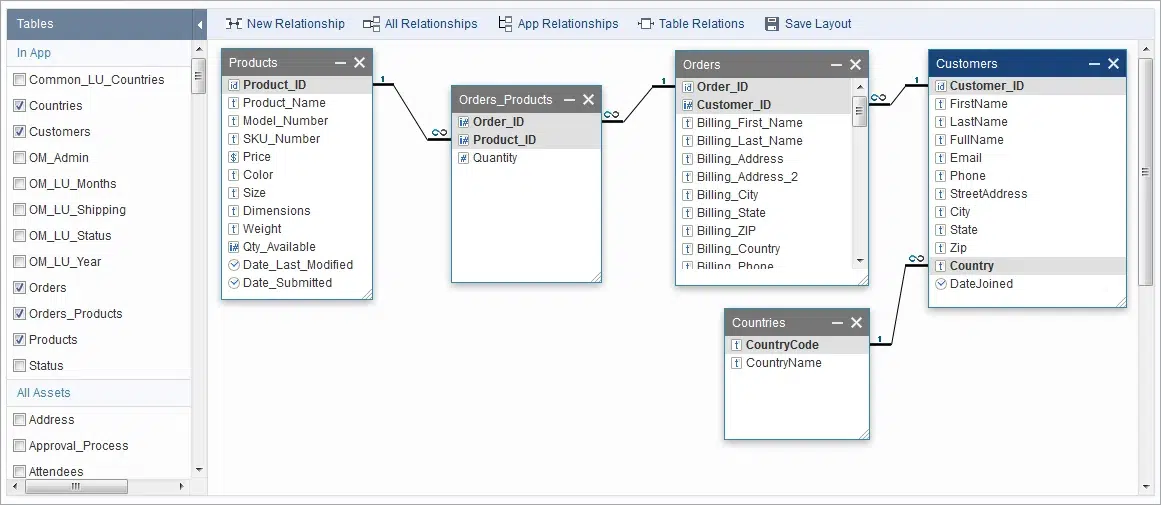
DATABASE RELATIONSHIPS: One-to-many relationships fan a parent to its children, while a many-to-many relationship is resolved correctly through a central junction table.
- Create one table per entity. Customers, Orders, Products, Order_Products, and Countries, each created in the Tables section.
- Give each a primary key. Add an Autonumber field for CustomerID, OrderID, and ProductID, each guaranteed to be unique. In the Orders_Products junction, the OrderID and ProductID pair serves as the key.
- Set the right data types. Use Currency for product price, Date/Time for order date, Integer for foreign keys, and Text for names and descriptions.
- Define one-to-many relationships. In the visual relationship designer, link Customers (parent) to Orders (child) using CustomerID. One customer, many orders.
- Resolve many-to-many relationships with a junction table. Order_Products stores OrderID and ProductID pairs, along with Quantity. Two one-to-many relationships into Order_Products create the many-to-many relationship between Orders and Products.
- Enforce data integrity. Mark key fields required, restrict fields to valid values, and configure referential integrity for related tables.
- Build the application. Create forms, search interfaces, reports, and dashboards on top of the database structure. Deploy them as standalone applications or embed them into existing websites and portals.
Because Caspio runs on a Microsoft SQL Server backbone hosted on AWS, these are true relational database structures with primary keys, foreign keys, and referential integrity, not a spreadsheet pretending to be a database. Business users, or non-developers, can apply professional database-design principles without writing SQL while benefiting from browser and mobile access, unlimited end users, enterprise integrations (REST APIs, webhooks, Zapier, Make, n8n, and Keragon for healthcare), AI-powered development tools and enterprise-grade security and compliance. Try Caspio free.
Customer Success: From Manual Processes to a Scalable Relational App
The University of California, Berkeley demonstrates the same transition at institutional scale. Within its School of Education, time-consuming manual processes and reporting workflows lacked a maintainable system of record. Applications Programmer Ricardo Gonzalez turned to Caspio to modernize those operations. What began as a search for a maintainable, non-proprietary database evolved into a secure web application that supports regional academies across California with role-based access, real-time reporting, and self-service data exploration for both internal staff and external partners.
Working with Caspio’s Professional Services team, Gonzalez and his colleagues delivered a scalable solution that eliminated manual reporting and significantly improved operational efficiency across departments. The project illustrates the same progression described throughout this guide: replacing disconnected, manual processes with a properly designed relational database that can grow into a full-featured business application.
Database Design Best Practices: Quick Reference
Here’s a practical summary of the core database design principles covered in this guide, why they matter, and how to apply each one in Caspio using a point-and-click approach.
| Best practice | Why it matters | How you do it in Caspio (point-and-click) |
|---|---|---|
| One table per entity | Keeps each entity cleanly separated and easy to relate | Create a table per entity in the Tables section |
| Unique primary key per record | Uniquely identifies every row and lets other tables reference it | Use an Autonumber, Prefixed Autonumber, Random ID, or GUID field, all always unique |
| Relationships, not duplicated data | Stores each fact once; a change updates everywhere automatically | Link tables with foreign keys in the visual relationship designer |
| One-to-many relationships | The most common link: one parent, many children (one customer, many orders) | Connect parent and child fields in the relationship designer |
| Many-to-many relationships | Models links on both sides correctly (orders and products) | Resolve with a junction table, the way standard database systems do |
| Right data type per field | Enables validation, correct sorting, and accurate calculations | Choose from Text, Number, Integer, Currency, Date/Time, Yes/No, and more per field |
| Normalize to remove redundancy | Eliminates duplicate, drifting data; 3NF is the practical target | Split into related tables; recombine with Views without duplicating data |
| Enforce data integrity | Keeps data valid, complete, and consistent across tables | Set required fields, restrict to valid values, and configure referential integrity |
| Design for the questions you ask | Ensures the structure supports the reports and searches users need | Pre-join with Views; build reports and search as fully hosted standalone apps or embeddable components |
From Design to Production
A sound design is what separates a real application from a fragile spreadsheet, and it unlocks everything that comes after:
- Multi-user concurrency. Multiple users can read and update data simultaneously without version conflicts.
- Accurate reporting. Because each fact is stored once, reports remain consistent across the organization.
- Clean integrations. A well-structured database connects predictably through REST APIs, Webhooks, Zapier, Make, n8n, and Keragon (for healthcare).
- Browser and mobile access. Users can access the application from anywhere, whether it’s embedded in an existing website or deployed as a standalone app.
- Audit-ready compliance. For regulated data, the platform matters as much as the schema. Caspio provides a SOC 2 Type II attestation and a HIPAA-compliant environment, both backed by annual independent audits, along with support for frameworks including FERPA, GDPR, ISO 27001 and PCI DSS. HIPAA-regulated workloads run on Caspio’s dedicated HIPAA/Compliance plan.
It also helps to understand where a purpose-built relational platform fits among the alternatives many organizations consider. Microsoft Access offers a true relational model, but it remains a Windows desktop application with a documented 2 GB database-size limit and limited support for modern cloud-based, multi-user deployments. Hand-coded SQL applications provide maximum flexibility but require specialized development skills and ongoing maintenance. Spreadsheet-style tools are easy to adopt, but they do not provide the same level of relational structure, key enforcement, and referential integrity as a relational database.
Caspio combines a point-and-click development experience with a Microsoft SQL Server backbone, allowing non-developers to apply proven database design principles without writing SQL. The result is a relational application that is easier to maintain, extend, and scale as business needs evolve. Start a free 14-day trial today.
Frequently Asked Questions
What are the most important database design best practices?
The most important database design best practices are to model each entity as its own table, give every record a unique primary key, connect tables with relationships rather than duplicating data, choose the correct data type for each field, normalize to store each fact once, and enforce data integrity through required fields and referential integrity. Together, these principles create a database that scales, reports accurately, and is easy to extend.
What is a database relationship, and what are the types?
A database relationship is a link between two tables, created by associating a field in one table with a field in another so related data stays connected without being copied. The three main types are one-to-many (one parent relates to many children, the most common), many-to-many (records on both sides relate to many on the other, resolved with a junction table), and one-to-one (each record relates to exactly one other, used to split sensitive or rarely used fields).
What is the difference between a primary key and a foreign key?
A primary key is a field whose value uniquely identifies each row in its own table and is never empty or duplicated. A foreign key is a field in one table that points to the primary key of another table, creating the relationship between them. In short, the primary key identifies a record, and the foreign key references it from elsewhere.
What is database normalization, and do I need it?
Database normalization is the practice of structuring data so each fact is stored once, in one place, then connected through relationships, which removes redundancy and the errors it causes. Yes, almost every business application benefits from normalization. Third normal form (3NF) is a practical target for most applications. At the same time, avoid over-normalizing to the point where simple queries require excessive joins.
How is a one-to-many relationship different from a many-to-many relationship?
In a one-to-many relationship, one parent record relates to many child records, but each child relates to only one parent, such as one customer with many orders. In a many-to-many relationship, records on both sides relate to many on the other, such as orders and products. These relationships are typically modeled using a junction table that stores the pairings.
Do I need to know SQL to design a database?
No. Database design principles such as entities, keys, relationships, data types, and normalization are concepts, not code. On a no-code platform like Caspio, you can create tables, choose data types, define primary keys, and establish relationships through a visual interface on a Microsoft SQL Server backbone, without writing SQL.
Why is a spreadsheet not a good substitute for a well-designed database?
Spreadsheets were not designed to manage relational data. They do not provide primary keys, foreign keys, referential integrity, or many of the controls that keep data accurate and consistent. As data grows and more people need access, spreadsheets often lead to duplication, conflicting versions, limited security, and reporting challenges. Relational databases are specifically designed to address those problems.
Can I design a relational database without coding?
Yes. Caspio allows non-developers to create tables, assign primary keys, choose field data types, define one-to-many and many-to-many relationships through a visual relationship designer, and enforce data integrity, all through a point-and-click interface. You can then build forms, search interfaces, and reports on top of the database as standalone applications or embeddable components.
Put These Best Practices Into Practice
You now have the principles. The fastest way to reinforce them is to apply them.
Caspio lets you implement every best practice covered in this guide through a point-and-click interface on a Microsoft SQL Server backbone. Create a table for each entity, assign unique primary keys, define relationships, choose appropriate data types, normalize your data, and enforce integrity rules without writing SQL. Then build forms, search interfaces, and reports on top of that foundation as standalone applications or embeddable components.
The platform includes unlimited users, enterprise integrations, powerful AI capabilities, 24/7 human support, a SOC 2 Type II attestation backed by annual independent audits, and a HIPAA-compliant environment.
Start your 14-day free trial of Caspio and build your first relational database with point-and-click tools, no SQL required. Paid plans start at $300/month.


Recommended Articles

9 Vibe Coding Security Risks in AI-Generated Apps
READ STORY Build Custom Business Apps Easily: 3 Patterns
READ STORY Caspio AI Connector Extensions: 5 Jobs for Your Tables
READ STORY PHI and Caspio AI: Which Features Your BAA Covers
READ STORY How AI Agents Buy Software, and Why Legibility Wins
READ STORY Build Internal Tools With AI: Best Tools for Business (2026)
READ STORY 10 Questions to Ask Before Connecting AI to Business Data
READ STORY Add a Role-Aware AI Chat Agent to Your Caspio App
READ STORY Lovable Alternatives for Business and Regulated Apps (2026)
READ STORY Vibe Coding vs. Low-Code: Key Differences and Where Caspio Fits in 2026
READ STORY Vibe Coding Governance: The IT Leader’s 2026 Checklist
READ STORY Code Artifact vs. Governed Platform: The Two Architectures
READ STORYSubscribe for More Updates

