5 Tips for Password Protecting Your Applications
September 26, 2011

When password protecting your application with Caspio authentication, the following best practices can be used as a checklist to ensure important safeguards are considered.
1. Username field should be unique
This is now enforced by Caspio when creating a new application, but your old apps may or may not be following this rule depending on how they were designed. Basically, the field designated as username must be set to be unique in Table Design.
2. Encrypt passwords
This is an option left to application owner, but we highly recommend encrypting password fields. This is done in Table Design by selecting Password as data type of the field. The data in encrypted password fields is never visible through any app interface or Caspio table. If a user needs to change their password, new data can be entered through a Password Recovery DataPage.
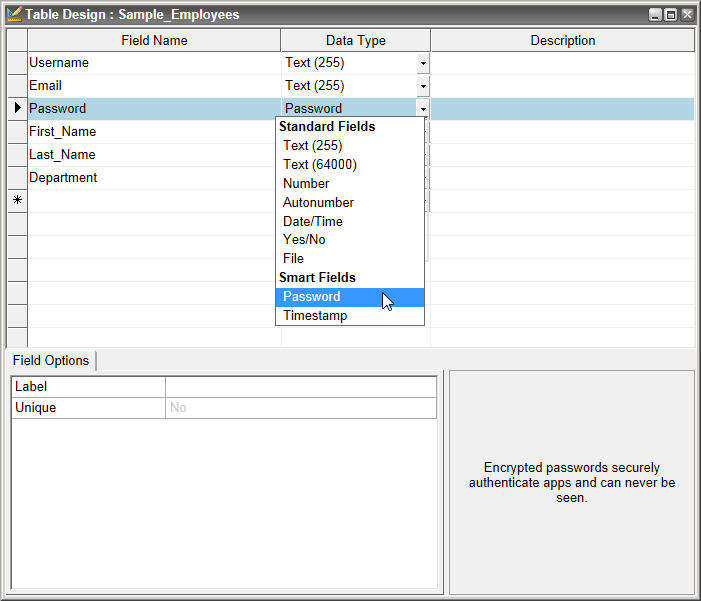
3. Password length and strength
In your form, require a minimum length for password that meets your standards. Many experts recommend requiring at least eight characters and including numbers and special characters. Enforcing strong passwords is a planned as a future option in Caspio, however at this time you can achieve this with a custom script.
4. Encourage regular password change
Prompt your users to change their password every 3 months and encourage them not to use old passwords. One way to prompt your users is to send an email which links to a Password Recovery DataPage.
5. Add CAPTCHA to login forms
To prevent brute force hacking, consider adding CAPTCHA to login forms. This can be done in the Authentication wizard when Advanced is selected on the first screen. Alternatively, you can ask for a two part authentication process, such as password and a security question.

To learn more about Caspio authentication, visit our HowTo site for step-by-step articles and video tutorials.
Do you have any other tips for securing your Caspio apps? Share it with other users.
Recommended Articles

AI and No-Code: Generative AI in App Development
READ STORY
Per-User Pricing vs Flat Rate: The Unlimited Users Math
READ STORY
Rebuild or Retrofit After a Failed Security Review (2026)
READ STORY
The Hidden Costs of Free AI App Builders (2026)
READ STORY
How to Read Vendor Compliance Claims: 3 Evidence Classes
READ STORY
What a BAA Covers (and Doesn't): HIPAA Guide for App Teams
READ STORY
How to Build an Online Database App Without Coding
READ STORY
HIPAA Compliance for No-Code Applications: A Guide
READ STORY
Tips on Migrating from Microsoft Access to Caspio
READ STORY
Best No-Code Platforms for Business Applications (2026)
READ STORY
Database Design Best Practices: A Practical Guide
READ STORY
Caspio vs. Knack: Which No-Code Platform Scales Better?
READ STORY
