Tech Tip: Automatically Import Data to Keep Your Caspio Applications Up-to-Date
January 7, 2015

For many Caspio users, importing and exporting data is a recurring task. You may not be aware that Caspio offers a number of features – some of them released within the last few months – to help you to streamline the entire import/export process.
In this blog, we would like to focus on two specific features which are each quite powerful in their own right, but truly shine when used together.
Import Update
In the Caspio Import Wizard, “Update” is a new addition to the existing import methods (Import as New, Append, Replace, and Update Design):
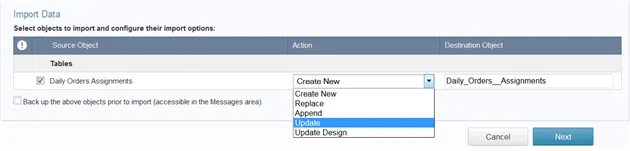
When you import a new data file and choose the Update option, the data in your file is compared against the existing data in your Caspio online database. If a matching record is found and the data in the file is different, the record will be automatically updated; and if there isn’t an existing matching record in the database, the data will be automatically added as a new record. All other records in the database are left untouched.
Using the Import Update feature, you can now easily import only the changed and new records to ensure your online application is up-to-date with any updates made outside of Caspio. Given that the alternative is to re-import the entire table every single time, this feature saves you a lot of energy, not to mention the data transfer if you are dealing with large tables.
DataHub
To put it simply, Caspio’s DataHub feature provides automated import/export. You can schedule data import and export tasks to run on-demand or at recurring frequencies:
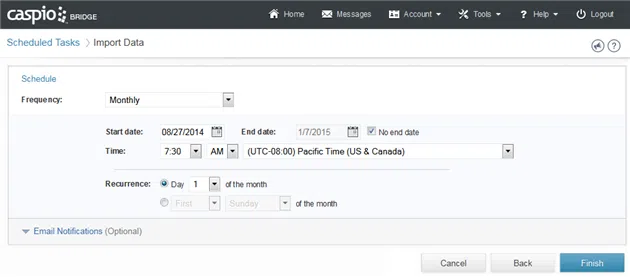
DataHub can interact with a variety of cloud storage services and protocols including Amazon S3, Dropbox, Microsoft OneDrive, Box, Google Drive, FTP, SFTP, FTPS, HTTP, etc.
Typical Use Case
Here is a usage scenario that many Caspio customers can relate to:
A printing service is using a Caspio application to allow their customers to check the status of their print orders. A legacy internal system is used to handle the operation of all print orders. A daily task is created on the internal system to export all the records that have a new status. This file is saved on a local folder that is synched to Dropbox. Caspio DataHub is scheduled to take this file every 2 hours and import the data into the Caspio application using the Import Update feature. As a result, customers can view the latest status of their orders.
Import Update and DataHub are available depending on your pricing plan. Please contact your Account Manager for detailed information.
Feel free to request a project consultation to learn more, or sign up for a free trial if you are new to Caspio.


Recommended Articles

Best Healthcare App Builder: 2026 Comparison
READ STORY
Build Internal Tools Without Developers: 7 IT Checks
READ STORY
Best Bubble Alternatives for Business Apps (2026)
READ STORY
Best App Builders for Small Medical Practices
READ STORY
Best Knack Alternatives (2026): AI and Compliance
READ STORY
Secure AI Code Generation: 10-Point Checklist
READ STORY
How to Build Internal Apps With AI in 2026: 6 Steps
READ STORY
Best Bolt.new Alternatives for Business Apps (2026)
READ STORY
Online Database With a SQL Backend: 7 Questions to Ask
READ STORY
9 Vibe Coding Security Risks in AI-Generated Apps
READ STORY
Build Custom Business Apps Easily: 3 Patterns
READ STORY
Caspio AI Connector Extensions: 5 Jobs for Your Tables
READ STORY
