How to Embed Web Forms in WordPress
August 9, 2013

 Caspio enables you to create many types of web forms with tremendous flexibility. A unique feature of Caspio-powered forms is that they can be embedded into any website platform, be it a CMS, blog, portal, or static website, and regardless of where or how it’s hosted.
Powering more than 60 million websites around the globe, WordPress is the most popular CMS on the web. While there are many plugins and various methods to embed forms into WordPress, Caspio provides a complete solution for centralized database management. Not only can you easily embed a Caspio-powered web form into WordPress, you can also create all kinds of database-driven applications to help you manage that data once it’s captured.
How to Embed Using the Caspio WordPress Plugin
With Caspio’s standard embedded deployment, a snippet of JavaScript code is generated so you can easily copy-and-paste it exactly where you want the form or app to appear on your page.
However, the WordPress Editor can easily scramble the deploy code because it doesn’t support JavaScript editing. Therefore, Caspio provides a WordPress Plugin utilizing shortcodes to streamline the deployment process.
All you need to do is download the plugin from the WordPress Plugin Library and paste the shortcode in your WordPress page:
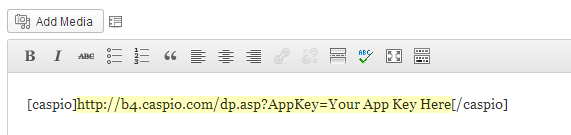
Insert the direct URL of your Caspio-powered form (available from the Deploy wizard), and the WordPress plugin will automatically replace the shortcode with the full deploy code at run-time.
For more details on using Caspio’s WordPress Plugin, read the how-to article.
How to Embed SEO-Friendly Content in WordPress
Caspio also provides an exclusive deployment technology to allow database-driven forms and applications to be fully indexed by search engines. Using Caspio’s SEO Deployment feature, the online database content is attributed to your own site so you can capture organic traffic for commonly-searched items such as job postings, real estate listings or public data records.
To use SEO Deployment in WordPress, make sure you have the feature enabled in your Caspio account (included in Business plans or higher). The SEO shortcode is slightly different from the one above:
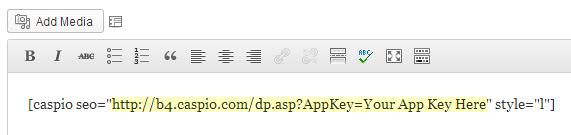
Refer to the SEO Deployment Guidelines for step-by-step instructions.
Feel free to post a comment below with any questions about Caspio’s WordPress or SEO Deployment.
New to Caspio? Sign up for a trial account and try it out for yourself.

Recommended Articles

Simple Project Management App for Remote Work Productivity
READ STORY
Custom CRM Tips to Improve Your Customer Relationships
READ STORY
20 Online Business Dashboards You Can’t Live Without
READ STORY
5 Apps to Support Teleworking and Business Continuity
READ STORY
Overcoming the Limitations of Excel for Data Management
READ STORY
How COVID-19 Changed the Role of CIOs
READ STORY
IT Helpdesk: 5 Essential Features to Look For
READ STORY
8 Low-Code Apps Your Government Needs Right Now
READ STORY
Digitally Transforming Midstream Oil & Gas Companies
READ STORY
