How Rapid is Caspio’s Rapid Application Development Platform?
September 14, 2017

 |
Guest Post By David Emerson, Founder and Creative Lead of SiteRocket Labs |
|---|
Caspio promises to save time and cost when compared to traditional code-based application development. How much time, though, will Caspio actually save and where are the savings realized?
SiteRocket Labs develops all types of web applications for our clients and we’re always on the lookout for ways to reduce time and cost. As a Caspio customer, here is our perspective on how Caspio’s rapid application development platform compares to traditional software engineering.
Let’s imagine a fictional project
For illustration purposes, let’s pretend that we’re developing an enterprise application using conventional software development tools and that our project requires 1,000 hours of work from start to finish.
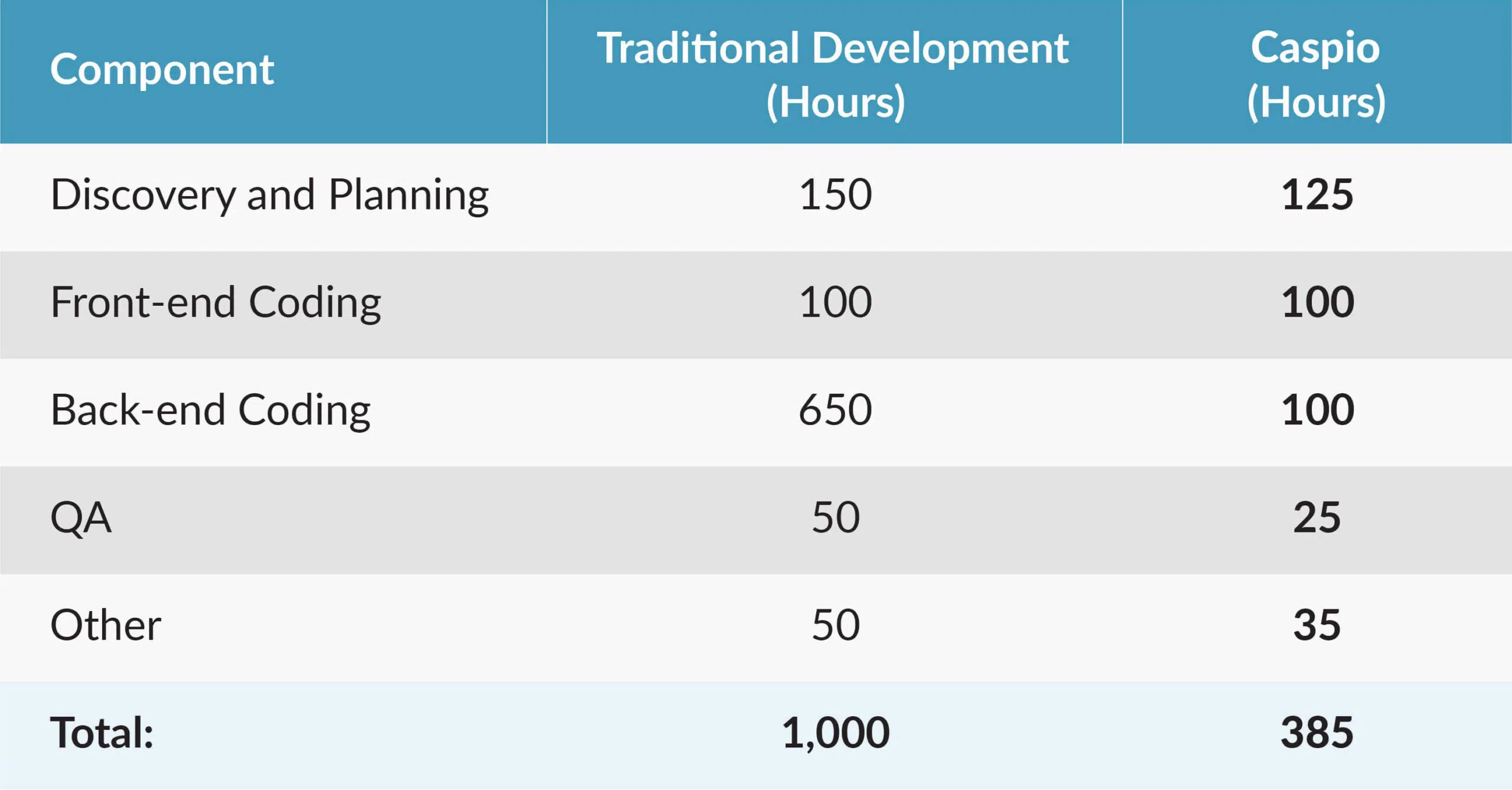
In our experience, researching and planning the application’s functionality will average roughly 15% of the project’s total time, meaning 150 hours for our project. In addition, let’s say that our application needs to have a particular look-and-feel and incorporate some slick interactive components. This requires 100 hours of front-end development work. Quality assurance (QA) might add another 50 hours. I’ll also allocate 50 hours to a bucket of other work that includes graphic design, server configuration, user testing and data migration. The rest of the time – 650 hours – will typically be needed for back-end code development.
The Caspio difference
How would our 1,000-hour project stack up if we developed it on Caspio?
Application development projects always require research and planning work. However, Caspio’s rapid application development platform makes it very easy to tweak the database structure and functionality over the course of the project as feedback comes in from user testing. This means that our planning will be a bit more “loose” if we use Caspio and I’d therefore estimate 125 rather than 150 hours of research and planning for our fictional project.
How about the front-end code? Because Caspio generates all of the web interfaces, our developer doesn’t need to spend time writing the front-end code to begin with. In our case, the developer would spend some time tweaking the application’s look-and-feel and adding the slick interactive elements and responsiveness that we want. Therefore, the front-end development still takes 100 hours.
The place where Caspio benefits us the most is in back-end development. In our experience, configuring an application with Caspio requires just 10% to 20% of the amount of time that it takes to develop the same functionality by writing code. This means that our imaginary application requires about 100 hours of configuration instead of 650 hours of coding.
With Caspio, the possibility of bugs due to configuration errors is greatly reduced and easier to fix. We’ll see 25 hours of QA and debugging for our 1,000 hour project rather than 50. Finally, because Caspio requires no database or server configuration, the “other” category decreases slightly, from 50 to 35 hours.
Where does this leave us for our 1,000 hour project?
When displayed in a column chart, the numbers look even more dramatic:

As we see from our imaginary example, our project uses just 38.5% the number of hours if developed on Caspio rather than using traditional development. This means that Caspio reduces our overall development time by over 60%.
A true rapid application development platform
With Caspio’s rapid application development platform, ongoing maintenance and upgrades are included as well. And if the application has special requirements such as HIPAA compliance, Caspio’s HIPAA Edition will reduce time-to-market even further.
While every web application is different, Caspio is a great fit for a wide range of applications and it offers compelling time and cost benefits.

Recommended Articles

How to Build a Member Portal Using Low Code
READ STORY
Best Zoho Creator Alternative Without Per-User Pricing
READ STORY
HIPAA Database Software: How to Choose a Compliant Platform
READ STORY
Enterprise Features at Mid-Market Prices: How Low-Code Changed the Game
READ STORY
Caspio vs. Airtable: Which No-Code Platform Is Right for Your Business?
READ STORY
Custom CRM: How to Build a CRM That Fits Your Business
READ STORY
How to Write Better AI Prompts in Caspio's AI-Powered GPT Connect
READ STORY
The 80/20 Modernization Strategy Using Low Code
READ STORY
Introducing the Caspio MCP Server
READ STORY
Why Citizen Developers Need Governance in Low-Code Platforms
READ STORY
How to Extend Your Student Information System | Secure Low-Code for Higher Ed
READ STORY
Citizen Developers: The Future of Enterprise Low-Code Development
READ STORY
