Caspio 8.0 Sneak Peek: Usability Enhancements to Existing Features
June 27, 2013

 Update on 10/31/13: The Caspio 8.0 Beta is now closed. Read the latest updates about the release.
Caspio was born 13 years ago with a simple vision – to change the way apps are built. With our DIY cloud database platform, app building is no longer about complex coding, costly maintenance or endless updates. Instead, it’s about focusing on your ideas while leveraging a technology that helps you bring those ideas to life quickly and easily.
Over the years we have seen countless companies build custom applications of all kinds to help them streamline processes, reduce costs and boost productivity. Driven by the desire to take an experience people enjoy and make it better, we are currently finalizing development of Caspio 8.0, an entirely redesigned product with the sole objective of making everything our customers do faster and simpler.
In Caspio 8.0, you will find:
- Brand new features
- Completely redesigned user interface
- Enhancements to existing features
While enhancing the existing features, one goal we worked very hard to achieve is striking a balance between simple design and efficient utility. We wanted to take the most frequently-used features and make them easier to access. Cramming all the available options on the same page could be one way to do it, but the beauty of simplicity would be lost.
Instead, we have integrated this spirit of simplicity into every detail of the new user interface design so that people can access the information right when they need it, without having to close windows or interrupt their current task. These improvements were implemented while maintaining a familiar “Caspio” workflow so that existing customers will feel comfortable adapting to the redesigned interface. It was a major challenge, and we look forward to hearing feedback from the ultimate judges – our users – as they experience Caspio 8.0.
Let’s take a look at some examples where the new approach significantly cuts down the number of steps to perform a task …
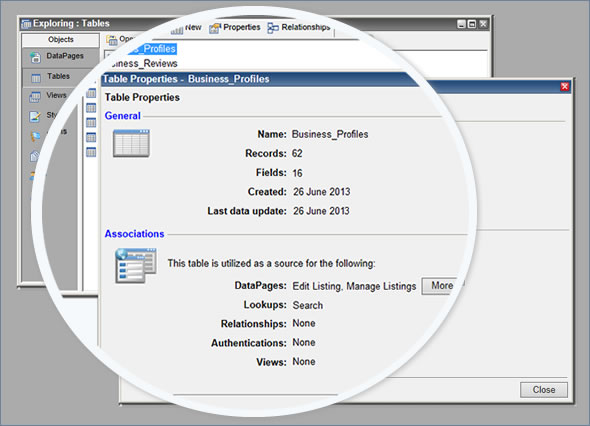
Tables are the most critical components of any app and oftentimes you need to quickly reference information such as number of records, size, dependencies, related objects, and the like. With the current version of Caspio, you need to select the table and click on “Properties” in order to access this information.
In Caspio 8.0, you can expand and collapse the table properties with one click directly under the table name. This functionality keeps vital information readily available whenever you want to see these details.
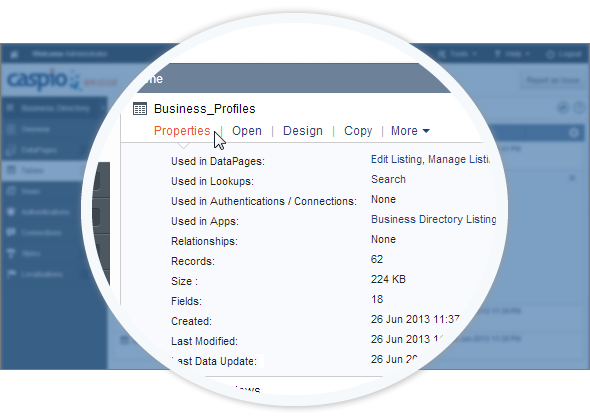
Additionally, the Properties section now includes hyperlinks to all the objects related to this table so you only have to click once to open up an associated object (such as a DataPage). Compare that to the current interface, where you have to first close out the properties dialog, navigate to the DataPages view, visually locate the DataPage name, and then open it.
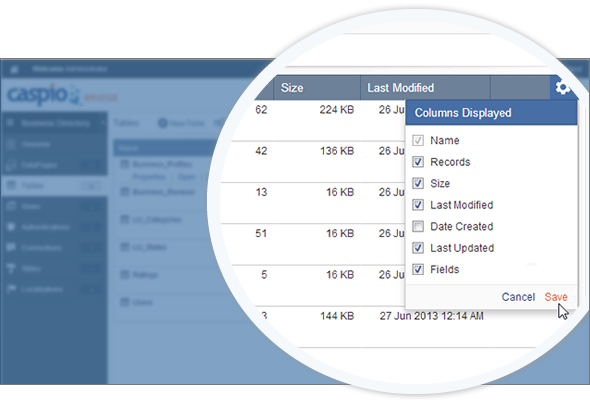
Furthermore, Caspio 8.0 provides a tabular layout displaying property information in sortable columns. You can easily customize the column order and add or remove specific columns as you prefer.
Simple enhancements like these are everywhere throughout Caspio 8.0. Together, we believe they contribute to significant gains in productivity while providing a more enjoyable experience.
These ideas are inspired by comments and feedback from our users and the passionate commitment from our product team. We certainly want to hear what you think!


Recommended Articles

How to Read Vendor Compliance Claims: 3 Evidence Classes
READ STORY
What a BAA Covers (and Doesn't): HIPAA Guide for App Teams
READ STORY
How to Build an Online Database App Without Coding
READ STORY
HIPAA Compliance for No-Code Applications: A Guide
READ STORY
Tips on Migrating from Microsoft Access to Caspio
READ STORY
Best No-Code Platforms for Business Applications (2026)
READ STORY
Database Design Best Practices: A Practical Guide
READ STORY
Caspio vs. Knack: Which No-Code Platform Scales Better?
READ STORY
Microsoft Access Online: How to Move Your Database to the Cloud
READ STORY
Best HIPAA-Compliant App Builders in 2026
READ STORY
Turn Spreadsheets Into Web Applications
READ STORY
Caspio vs. Power Apps: Which Low-Code Platform Is Better in 2026?
READ STORY
