New Release: Caspio 9.0
December 22, 2015

 We’re excited to announce the immediate availability of Caspio 9.0 for all new and existing customers. This release includes three major features and many smaller enhancements – all designed to improve the usability and security of your Caspio applications.
Read the release notes for the complete details about this upgrade.
Highlights:
SAML Single Sign-On
Single sign-on (SSO) allows users to enter the same username and password across multiple applications. With Caspio’s new SSO feature, you can authenticate your Caspio applications using your own corporate directory service such as Microsoft Active Directory.
Implementing SSO in your Caspio applications not only reduces the number of usernames and passwords you have to manage, it also helps you centralize access management for all users and applications in accordance with any internal corporate security requirements.
Caspio has adopted SAML 2.0, which supports many directory services including Active Directory Federation Services 2.0 and 3.0, Microsoft Azure AD, Salesforce, OneLogin, Okta, PingOne, and Auth0.
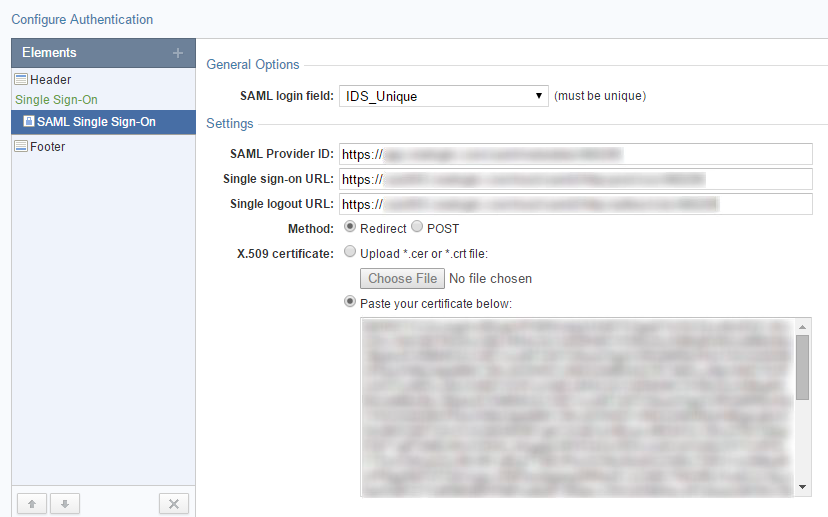
In Caspio, SAML Single Sign-On can be configured by creating a new Authentication object:
Pivot Table Reports
Using this new type of DataPage, you can easily create summarization and cross-tabulation reports to view data from different perspectives and discover insights that might otherwise be difficult to see.
Pivot Table Reports can process a large amount of data and generate reports that aggregate data into groups showing grand totals, subtotals, averages, and other calculations.
Watch the video below to see how to create a Pivot Table Report in Caspio:
Customizable Account Security Policy
It is now possible to define a custom security policy for all users signing into your Caspio account. You can set specific requirements for password strength, expiration and re-use, as well as rules for session timeout, account lockout, and disabling inactive users.
This feature is particularly important for corporations and organizations that need to adhere to internal or regulatory security requirements.
Other Enhancements
The 9.0 release includes many smaller enhancements, some of which are listed below, but be sure to read the release notes for the full list.
- You can now route notification emails to dynamic addresses, rather than a static email list.
- Aggregations set to display “Below” will be combined and moved into the grouping row when collapsed.
- A new “Auto-Align” setting automatically right-aligns Number and Date columns in tabular reports, while all other data remains left-aligned.
- A new “Notes” field is available in the Properties area to save internal notes for any object in your Caspio account.
- Keyboard hotkeys are now available in table and view datasheets.
- Caspio account sub-users can now reset their passwords by clicking on the “Forgot Password” link on the Caspio login screen.
- When creating new account sub-users, an email invitation will be sent to users providing instructions to create their password and sign into the account.
We would love to hear your feedback! Leave a comment below and submit new feature ideas in the Caspio Ideabox.


Recommended Articles

Simple Project Management App for Remote Work Productivity
READ STORY
Custom CRM Tips to Improve Your Customer Relationships
READ STORY
20 Online Business Dashboards You Can’t Live Without
READ STORY
5 Apps to Support Teleworking and Business Continuity
READ STORY
Overcoming the Limitations of Excel for Data Management
READ STORY
How COVID-19 Changed the Role of CIOs
READ STORY
IT Helpdesk: 5 Essential Features to Look For
READ STORY
8 Low-Code Apps Your Government Needs Right Now
READ STORY
Digitally Transforming Midstream Oil & Gas Companies
READ STORY
