Caspio logo Try Free
  • Platform
    • Why Caspio
      Why Caspio
      • Platform Overview
      • What is Low Code
      • Visual App Builder
      • Database
      • Identity Management
      • Automations
      • AI Capabilities
      • Integrations
      • Customer Stories
    • shield-check
      Security & Compliance
      • HIPAA Compliance
      • SOC 2 Compliance
      • FERPA Compliance
      • WCAG Compliance
      • Compliance Overview
      • Trust Center
    • Launch-faster-icon
      Get Started
      • Free Trial
      • Request a Consultation
      • Contact Sales
  • Solutions
    • Industries
      By Industry
      • Healthcare
      • Education
      • Government
      • Financial Services
      • Energy and Utilities
      • Nonprofits
      • Media
      • Consulting
    • Use Case
      By Use Case
      • HIPAA Compliant Apps
      • Custom CRM
      • Excel to Web
      • Finance Management
      • Asset Management
      • Patient Portal
      • Web Dashboard
      • MS Access to Cloud
    • document-generation
      App Templates
      • Custom CRM
      • Patient Portal
      • Knowledge Base
      • Project Management
      • Support Ticketing System
      • Contact Management
      • Task Management
      • View All
    • Launch-faster-icon
      Get Started
      • Free Trial
      • Request a Consultation
      • Contact Sales
  • Build
    • mouse-click-icon
      Build It Yourself
      • Tutorials
      • Starter Apps
      • Caspio Academy
    • professional_services_icon
      Work With Experts
      • Professional Services
      • Managed Application Services
      • Work With a Partner
      • Onboarding
      • Expert Sessions
    • Launch-faster-icon
      Get Started
      • Free Trial
      • Request a Consultation
      • Contact Sales
  • Resources
    • book
      Learn
      • Caspio Academy
      • Get Certified
    • signed-BAA_icon
      Explore
      • Blogs
      • Podcast
      • Events
      • Customer Stories
      • View All
    • store_icon
      Marketplace
      • Starter Apps
      • App Blocks
      • Extensions
      • Customizations
      • Vertical Solutions
      • View All
    • Launch-faster-icon
      Get Started
      • Free Trial
      • Request a Consultation
      • Contact Sales
  • Pricing
    • Money-on-palm-icon
      Pricing Plans
      • Standard Plans
      • Caspio HIPAA Edition
    • Launch-faster-icon
      Getting Started
      • Free Trial
      • Request a Consultation
      • Contact Sales
  • High Contrast
  • search
  • Contact Sales
  • Support
    • Online Help
    • Community Forum
    • Contact Support
  • Log in
Get a Demo Try Free

3 Easy Ways to Export Your Web Forms Data Into Excel

June 5, 2019

  • Tech Tips
  • Customer Spotlight
  • News Articles
Try Free
  • Home
  • Blog
  • Current Article
5506
June 5, 2019

One of the main features that Caspio users love about our low-code platform is how simple it is to convert Excel spreadsheets to a web application.

Hundreds of organizations, from SMEs and large businesses to government and nonprofit organizations, have used Caspio to move from cumbersome spreadsheets to feature-rich custom applications. But what about the other way around—what if you want to export your web forms data into Excel?

Storing web form submissions in spreadsheets is easier than you think. We’ll show you three ways to save web form data to Excel spreadsheets.

Watch our Excel to web video guide if you want to convert spreadsheets to web apps instead.

When to Export Data from Web Forms to Excel

Web forms are great for managing registrations and subscriptions, taking orders, and most importantly, collecting leads.

web-forms-to-excel-hubspot-lead-generation

Web forms are so effective that as much as 74% of marketers surveyed by marketing automation software HubSpot said they use web forms for lead generation. Nearly 50% consider online forms as their highest converting lead generation tool.

With Caspio, you can build web forms without coding and start capturing leads through your website. That data is then stored centrally and securely in the cloud.

However, there are times when you want to download your data to a spreadsheet and process it there. Here are some instances you may want to export data from web forms to Excel:

  • When Accessing, Processing Data Offline

Going somewhere without internet connection but still need to work on your data? Perhaps you’re unsure if Wi-Fi is available? Or maybe you want to crunch those numbers while in transit. Storing your Excel file locally on your computer or laptop may be your best bet in these situations.

  • When Sharing Back Pocket or Raw Data
web-forms-to-excel-import-export-data-in-caspio
VICE-VERSA: Caspio allows users to import their data into the platform and export it whenever necessary.

Visual reports are great. With Caspio, you can create visual reports and even build online dashboards to better present vital information. Sometimes though, you’ll need more than just key insights.

If you need to share raw data to your audience, or if you need back pocket data to support your presentation, you might need to have an Excel document ready. Some parties also prefer spreadsheets, especially when they need to check not just the numbers but also the formulas (think of an accountant auditing your books). In cases like these, downloading your data from a web form to an Excel spreadsheet is the best route.

  • When Performing Complex Calculations

Some numbers junkies just can’t work with other tools; they live and breathe Excel. After all, Excel is one of the best platforms for data crunching, and its built-in pivot tables and unique functions are arguably among the most favored tools by data analysts.

In such situation, download your data from your Caspio online database, do your magic in Excel, and simply import your workbook back to the platform.

How to Export Data from Web Forms to Excel

Caspio has made it simple for users to get the data captured by online forms and put it into spreadsheets. Here are three easy methods to save web form data to Excel:

1. ‘Live’ Data Refresh via the Caspio Plugin for MS Office

Caspio users can download our Microsoft Office Plugin and connect their desktop Office tools like Excel to their Caspio accounts. This way, the data inside a Caspio DataPage that is populated by web form submissions can be pushed into an Excel spreadsheet on a user’s desktop—automatically.

web-forms-to-excel-microsoft-office-plugin-for-caspio
PLUG IT IN: With Caspio’s MS Office plugin, you can instantly download your online data to Excel for easy integration, data analysis and mail merge.

Data inside the spreadsheets is automatically refreshed every time the user connects to the internet and opens that Excel file while they are online. Therefore, you no longer have to manually export data from web forms to Excel every time you need the latest information.

This is a great tool for performing up-to-date mail merges and other activities, where the freshest data possible is needed. Evidently, this type of “up to the minute” data capabilities cannot be gained using Excel alone.

2. Web Forms to Excel via Manual and Automated Export

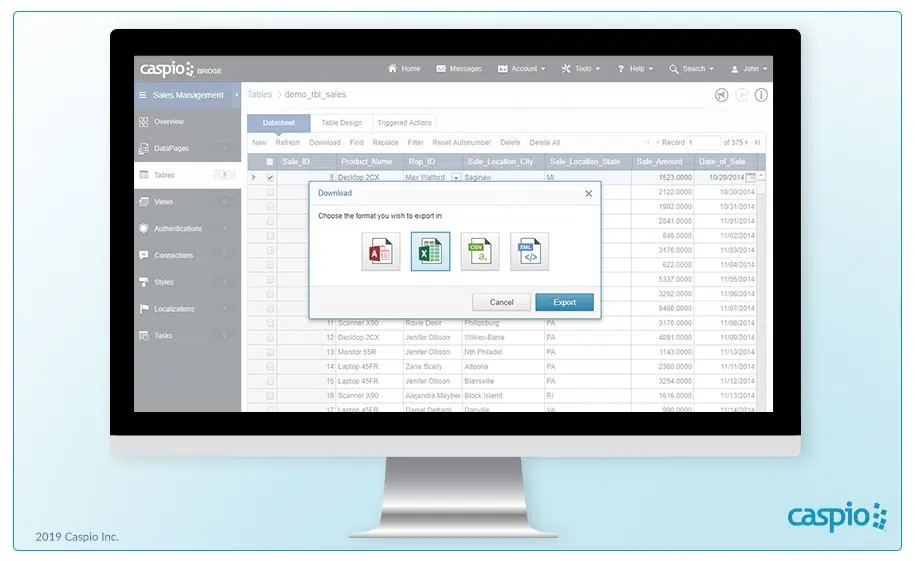
Perhaps the most direct way to save web form data to Excel is through simple Caspio Export tools. A simple Export Wizard inside the Caspio administration panel guides users through the process of downloading data from a database that contains information from web form submissions.

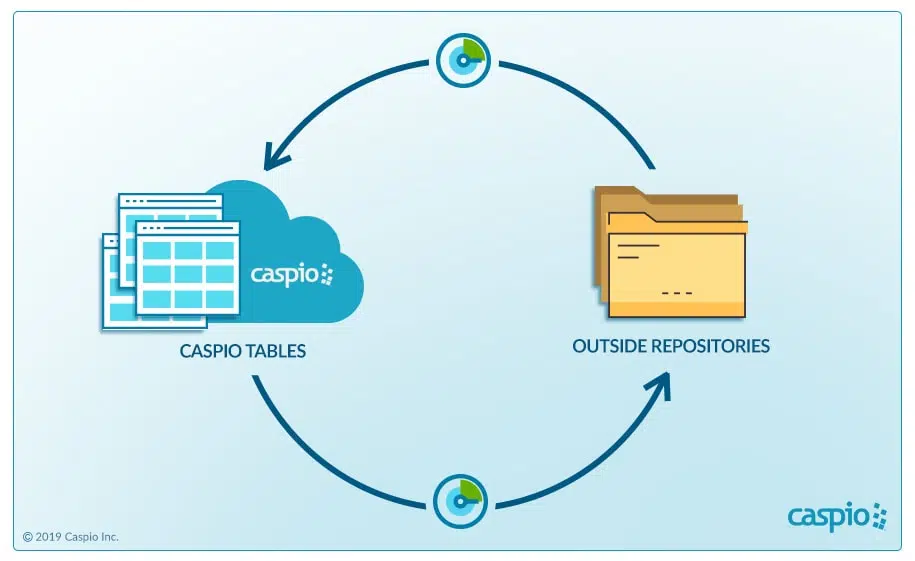
It is also easy to set up Caspio DataHub, which allows users to schedule data imports and exports to or from Excel.
web-forms-to-excel-caspio-datahub-manual-automated-export
TO-AND-FRO: Through Caspio’s DataHub, you can create scheduled tasks for importing and exporting to and from your Caspio account.

3. Create Downloadable Search Forms

A great way to quickly enable the creation of an Excel sheet from nearly any Caspio-powered data set is by enabling users to download their searches.

This way, users can create spreadsheets of the records they need, especially if they only need a partial list from an entire data set (for example: form submissions over the past 24 hours).

With a few clicks, Caspio users can bring the power of online data into previously limited desktop tools like Excel.
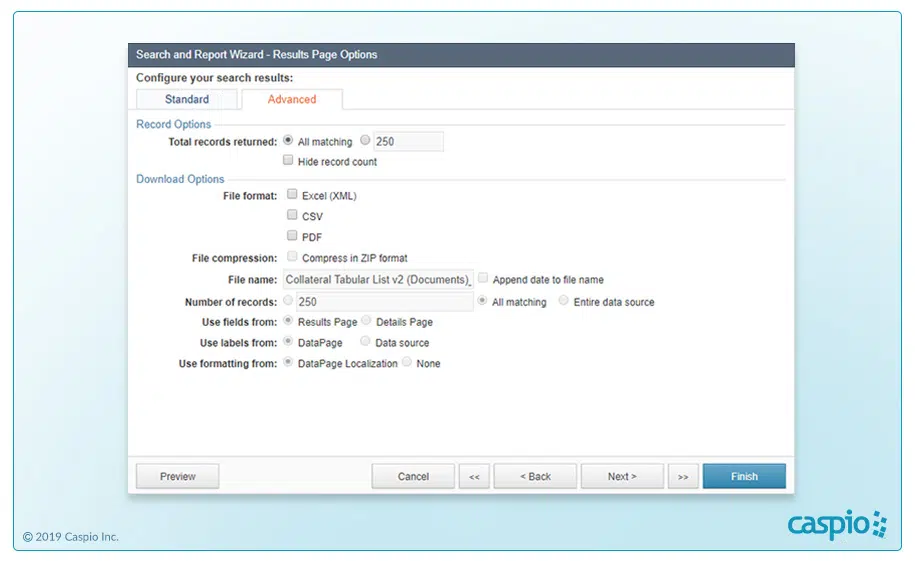
web-forms-to-excel-download-data-sets-in-excel-format
SEARCH AND DOWNLOAD: Caspio allows users to download data sets from search results in a variety of formats.

Save Web Form Data to Excel, Vice-Versa

Excel has its place inside any organization. Meanwhile, web forms are a valuable tool for collecting and centralizing important data captured through your websit­­­e.

But by using Caspio and Excel together, you get the best of bo­­th worlds.

Caspio allows you to collect information as usual via custom web forms and then import or export the information you gather to Excel. This means you can use Excel as usual when it comes to crunching numbers but still gain the convenience and security of an online database with Caspio.

Chemily Information Management Company is one company that managed to get the best of both worlds.

YouTube image 1

Chemily’s biggest challenge was ensuring only certain users access specific data from their network. They also needed to do this while integrating multiple tools into one system.

Thanks to Caspio’s feature-rich low-code platform and user authentication technology, Chemily succeeded in building a secure online database. Today, thousands of the company’s clients securely view their utility bills online.

“One of my favorite things about Caspio is we’ll use Excel and import the spreadsheets into the platform instead of double-doing the work. It allows us to integrate all our systems into one.”


Veronica Vela, Controller
Chemily Information Management Company

If needed, Chemily also has the power to export specific data easily from their custom applications into Excel spreadsheets.

So, whether you want to build online forms from spreadsheets or save web form data to Excel, you can use Caspio to efficiently meet your business needs.

Check out these tips and more on our Caspio Online Help site or schedule a demo to see how easy it is to export data from web forms to Excel spreadsheets and vice-versa.

Once you’re ready, use our free database builder to start offloading your web forms today.

Call to Action Block Call to Action Block

Share this post:

Previous Post:
3 Easy Steps to Building a Searchable Database App
Next Post:
Excel to Web: Have You Outgrown Your Spreadsheets?

Recommended Articles

Database Design Best Practices: A Practical Guide for Business Applications

Database Design Best Practices: A Practical Guide

READ STORY
Caspio vs. Knack: Which No-Code Platform Scales With Your Business?

Caspio vs. Knack: Which No-Code Platform Scales Better?

READ STORY
Microsoft Access Online: How to Move Your Database to the Cloud

Microsoft Access Online: How to Move Your Database to the Cloud

READ STORY
Best HIPAA-Compliant App Builders in 2026

Best HIPAA-Compliant App Builders in 2026

READ STORY
Turn Spreadsheets Into Web Applications

Turn Spreadsheets Into Web Applications

READ STORY
Caspio vs. Microsoft Power Apps: An Honest 2026 Comparison

Caspio vs. Power Apps: Which Low-Code Platform Is Better in 2026?

READ STORY
The State of No-Code in 2026

The State of No-Code in 2026: Market Trends and What’s Next

READ STORY
HIPAA-Compliant Forms for Healthcare Organizations

HIPAA-Compliant Forms for Healthcare Organizations: A Guide

READ STORY
Best Custom CRM Platforms in 2026

Best Custom CRM Platforms in 2026: Top CRM Builders Ranked

READ STORY
No-Code vs. Low-Code: What’s the Difference?

No-Code vs. Low-Code: Key Differences & How to Choose

READ STORY

Top Blaze.tech Alternatives for Business Applications in 2026

Top Blaze.tech Alternatives for Business Apps in 2026

READ STORY
Customer Portal Software: Build a Self-Service Experience

Custom Customer Portal Software for Growing Businesses

READ STORY
Subscribe for More Updates
  • PRODUCT

  • Platform Overview
  • What Is Low Code?
  • Case Studies
  • Marketplace
  • Pricing
  • Get a Custom Demo
  • Free Trial
  • SOLUTIONS

  • Healthcare
  • Education
  • Government
  • Financial Services
  • Energy and Utilities
  • Nonprofits
  • Media
  • Consulting
  • RESOURCES

  • Resource Center
  • Caspio Academy
  • Online Help
  • Onboarding
  • Get Certified
  • Professional Services
  • Managed Application Services
  • Support Center
  • Legal Center
  • COMPANY

  • Our Story
  • Careers
  • Leadership
  • News
  • Partner Programs
  • Referral Program
  • Academic Program
  • Discount Programs
  • Contact Us
  • TRENDING

  • HIPAA Compliance
  • SOC 2 Type 2 Compliance
  • FERPA Compliance
  • Build Custom CRM
  • Create Web Dashboards
  • Best Online Database
  • Build a Mini CRM SaaS in 1 Hour
  • Go Paperless With Web Forms
  • Launch Patient Portal
Caspio Logo

Caspio is the world’s leading cloud platform for building online database applications without coding.
Start a free trial today and experience the power of no-code.

Footer Partners

© 2026 Caspio, Inc. Sunnyvale, California. All rights reserved.

  • Privacy Statement
  • Terms of Use
  • Report Abuse
  • Sitemap
  • Feedback
  • Platform
    • Why Caspio
      • Platform Overview
      • What is Low Code
      • Visual App Builder
      • Database
      • Identity Management
      • Automations
      • AI Capabilities
      • Integrations
      • Customer Stories
    • Security & Compliance
      • HIPAA Compliance
      • SOC 2 Compliance
      • FERPA Compliance
      • WCAG Compliance
      • Compliance Overview
      • Trust Center
    • Get Started
      • Free Trial
      • Request a Consultation
      • Contact Sales
  • Solutions
    • By Industry
      • Healthcare
      • Education
      • Government
      • Financial Services
      • Energy and Utilities
      • Nonprofits
      • Media
      • Consulting
    • By Use Case
      • HIPAA Compliant Apps
      • Custom CRM
      • Excel to Web
      • Finance Management
      • Asset Management
      • Patient Portal
      • Web Dashboard
      • MS Access to Cloud
    • App Templates
      • Custom CRM
      • Patient Portal
      • Knowledge Base
      • Project Management
      • Support Ticketing System
      • Contact Management
      • Task Management
      • View All
    • Get Started
      • Free Trial
      • Request a Consultation
      • Contact Sales
  • Build
    • Build It Yourself
      • Tutorials
      • Starter Apps
      • Caspio Academy
    • Work With Experts
      • Professional Services
      • Managed Application Services
      • Work With a Partner
      • Onboarding
      • Expert Sessions
    • Get Started
      • Free Trial
      • Request a Consultation
      • Contact Sales
  • Resources
    • Learn
      • Caspio Academy
      • Get Certified
    • Explore
      • Blogs
      • Podcast
      • Events
      • Customer Stories
      • View All
    • Marketplace
      • Starter Apps
      • App Blocks
      • Extensions
      • Customizations
      • Vertical Solutions
      • View All
    • Get Started
      • Free Trial
      • Request a Consultation
      • Contact Sales
  • Pricing
    • Pricing Plans
      • Standard Plans
      • Caspio HIPAA Edition
    • Getting Started
      • Free Trial
      • Request a Consultation
      • Contact Sales
  • search
  • Contact Sales
  • Support
    • Online Help
    • Community Forum
    • Contact Support
  • Log in
Get a Demo Try Free
High Contrast