Caspio Roadmap: Grid Editing, Bulk Actions, and More
October 10, 2014

User feedback has always been an important part of Caspio’s product roadmap planning. As we plan for the upcoming releases, we’d like to share some important updates with our user community, as well as get your feedback.
One major feature that is currently under development is “bulk actions” in Report DataPages, currently scheduled for release at the beginning of 2015.
Here are some highlights about this feature:
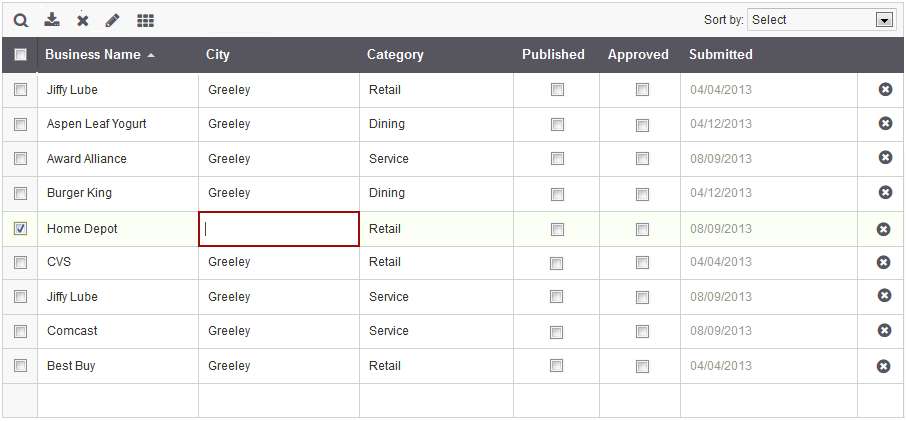
- Grid Edit – In tabular reports, you can switch between the current display-only mode to a grid-edit mode. In grid-edit mode, you can edit each cell just like you currently can in Table Datasheets inside Caspio. The updated values will be automatically saved once the cursor moves to another row. No need to click a submit button or reload the page.
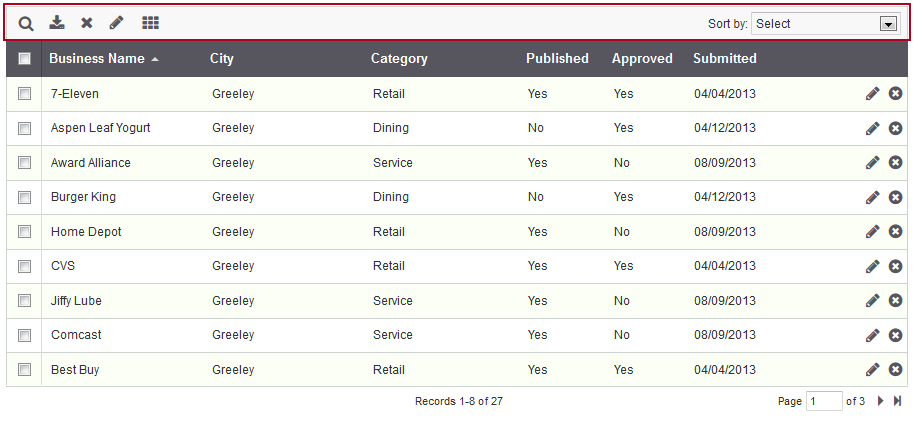
- New Action Bar – The action bar is like a toolbar that will appear on top of your reports. This is where icons for delete, update and other actions will be shown.
- Bulk Edit – In addition to grid-edit, you will also be able to update fields for multiple records using a bulk-edit operation. First, select the records you want to update and click on the bulk-edit icon. This will pop up an interface to update any fields that are configured for bulk editing.
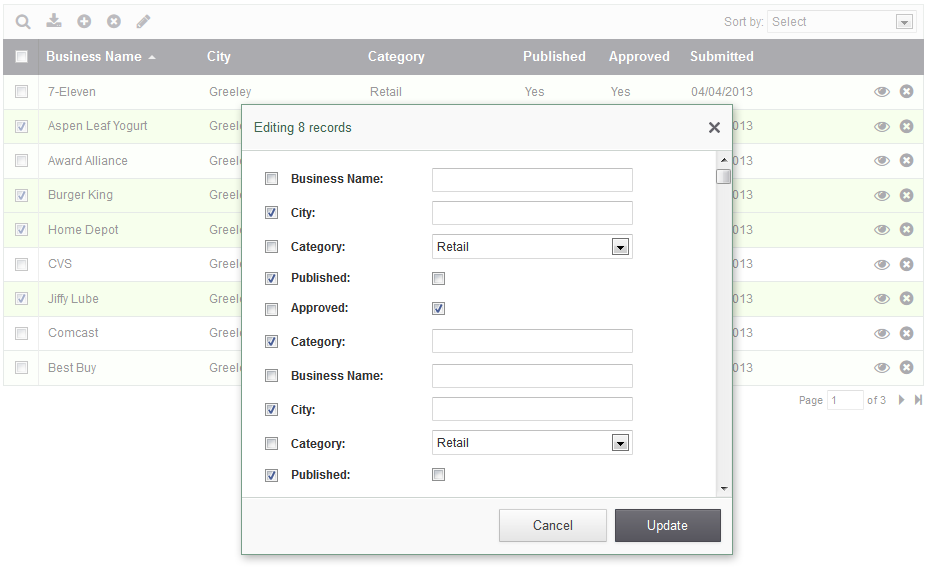
- Bulk Delete – With the ability to update multiple records, you can also enable the option to bulk-delete multiple records. This can be done by selecting the records you want to delete and then clicking on the delete icon in the action bar.
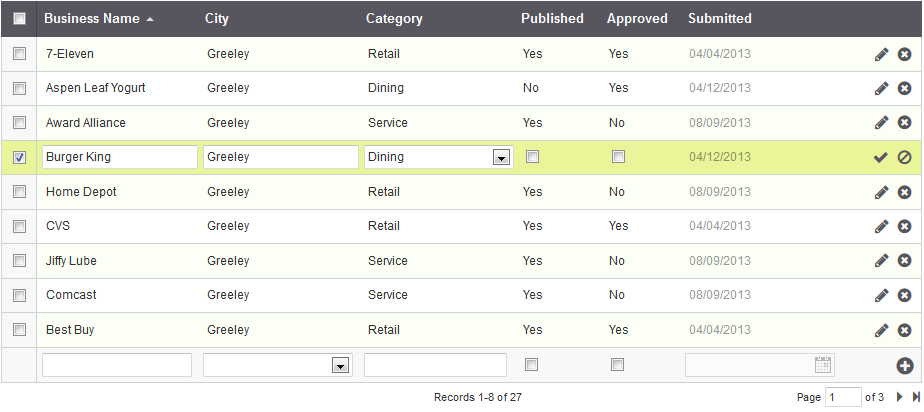
- Enhanced Inline Insert and Inline Edit – Currently, inline editing can only be performed through text fields. With this enhancement, you will be able to use dropdowns, checkboxes and other elements during inline editing.
- Sorting & Paging Enhancements – Sorting and paging in results sets will be much faster using dynamic rendering that doesn’t require the entire page to be reloaded.
- Record Auto-Load Instead of Paging – You will be able to enable auto-scroll and auto-load of records instead of paging in results sets. New records will automatically appear as you scroll down the page.
- Frozen Headers in Tabular Reports – You can also choose to freeze the top header row of tabular reports whenever auto-scroll is enabled. Your header row will then remain visible at all times for improved usability.
Let us know what you think about these upcoming features, or if you have any ideas for further enhancement. Please leave a comment below with your thoughts.
Additionally, we would also like to know if you are interested in keeping the existing “non-dynamic” reports, or if you care about page-reload with each new page of data.


Recommended Articles

10 Questions to Ask Before Connecting AI to Business Data
READ STORY
Add a Role-Aware AI Chat Agent to Your Caspio App
READ STORY
Lovable Alternatives for Business and Regulated Apps (2026)
READ STORY
Vibe Coding vs. Low-Code: Key Differences and Where Caspio Fits in 2026
READ STORY
Vibe Coding Governance: The IT Leader’s 2026 Checklist
READ STORY
Code Artifact vs. Governed Platform: The Two Architectures
READ STORY
Shadow AI Apps Are the New Shadow IT: A 2026 Guide
READ STORY
Secure Alternatives to Vibe Coding for Business Apps (2026)
READ STORY
AI App Builders for Regulated Industries: 2026 Buyer's Guide
READ STORY
AI and No-Code: Generative AI in App Development
READ STORY
Per-User Pricing vs Flat Rate: The Unlimited Users Math
READ STORY
Rebuild or Retrofit After a Failed Security Review (2026)
READ STORY
