• Platform
    • Why Caspio
      • Platform Overview
      • What is Low Code
      • Visual App Builder
      • Database
      • Identity Management
      • Automations
      • AI Capabilities
      • Integrations
      • Customer Stories
    • Security & Compliance
      • HIPAA Compliance
      • SOC 2 Compliance
      • FERPA Compliance
      • WCAG Compliance
      • Compliance Overview
      • Trust Center
    • Get Started
      • Free Trial
      • Request a Consultation
      • Contact Sales
  • Solutions
    • By Industry
      • Healthcare
      • Education
      • Government
      • Financial Services
      • Energy and Utilities
      • Nonprofits
      • Media
      • Consulting
    • By Use Case
      • HIPAA Compliant Apps
      • Custom CRM
      • Excel to Web
      • Finance Management
      • Asset Management
      • Patient Portal
      • Web Dashboard
      • MS Access to Cloud
    • App Templates
      • Custom CRM
      • Patient Portal
      • Knowledge Base
      • Project Management
      • Support Ticketing System
      • Contact Management
      • Task Management
      • View All
    • Get Started
      • Free Trial
      • Request a Consultation
      • Contact Sales
  • Build
    • Build It Yourself
      • Tutorials
      • Starter Apps
      • Caspio Academy
    • Work With Experts
      • Professional Services
      • Managed Application Services
      • Work With a Partner
      • Onboarding
      • Expert Sessions
    • Get Started
      • Free Trial
      • Request a Consultation
      • Contact Sales
  • Resources
    • Learn
      • Caspio Academy
      • Get Certified
    • Explore
      • Blogs
      • Podcast
      • Events
      • Customer Stories
      • View All
    • Marketplace
      • Starter Apps
      • App Blocks
      • Extensions
      • Customizations
      • Vertical Solutions
      • View All
    • Get Started
      • Free Trial
      • Request a Consultation
      • Contact Sales
  • Pricing
  • search
  • Contact Sales
  • Support
    • Online Help
    • Community Forum
    • Contact Support
  • Log in
Get a Demo Try Free
High Contrast
Caspio logo Try Free
  • Platform
    • menu-product-icon[1]
      Why Caspio
      • Platform Overview
      • What is Low Code
      • Visual App Builder
      • Database
      • Identity Management
      • Automations
      • AI Capabilities
      • Integrations
      • Customer Stories
    • Security & Compliance
      • HIPAA Compliance
      • SOC 2 Compliance
      • FERPA Compliance
      • WCAG Compliance
      • Compliance Overview
      • Trust Center
    • get-started-icon
      Get Started
      • Free Trial
      • Request a Consultation
      • Contact Sales
  • Solutions
    • By Industry
      • Healthcare
      • Education
      • Government
      • Financial Services
      • Energy and Utilities
      • Nonprofits
      • Media
      • Consulting
    • By Use Case
      • HIPAA Compliant Apps
      • Custom CRM
      • Excel to Web
      • Finance Management
      • Asset Management
      • Patient Portal
      • Web Dashboard
      • MS Access to Cloud
    • App Templates
      • Custom CRM
      • Patient Portal
      • Knowledge Base
      • Project Management
      • Support Ticketing System
      • Contact Management
      • Task Management
      • View All
    • Get Started
      • Free Trial
      • Request a Consultation
      • Contact Sales
  • Build
    • menu-resources-icon[1]
      Build It Yourself
      • Tutorials
      • Starter Apps
      • Caspio Academy
    • menu-plan-for-success-icon[1]
      Work With Experts
      • Professional Services
      • Managed Application Services
      • Work With a Partner
      • Onboarding
      • Expert Sessions
    • get-started-icon
      Get Started
      • Free Trial
      • Request a Consultation
      • Contact Sales
  • Resources
    • menu-resources-icon[1]
      Learn
      • Caspio Academy
      • Get Certified
    • menu-plan-for-success-icon[1]
      Explore
      • Blogs
      • Podcast
      • Events
      • Customer Stories
      • View All
    • marketplace_nav-icon
      Marketplace
      • Starter Apps
      • App Blocks
      • Extensions
      • Customizations
      • Vertical Solutions
      • View All
    • get-started-icon
      Get Started
      • Free Trial
      • Request a Consultation
      • Contact Sales
  • Pricing
  • High Contrast
  • search
  • Contact Sales
  • Support
    • Online Help
    • Community Forum
    • Contact Support
  • Log in
Get a Demo Try Free

Automate Workflows: How to Use Triggered Actions and Tasks in Your Caspio Applications

November 17, 2022

  • Tech Tips
  • Customer Spotlight
  • News Articles
Try Free
  • Home
  • Blog
  • Current Article
97779
November 17, 2022

Generating reports, tracking customer feedback, updating inventories and more – all these are manual, time-consuming duties that are necessary to run the business. But imagine if you can free yourself up from repetitive tasks, allowing you to focus on more impactful responsibilities.

Automations can help!

Studies show that the number of automations is doubling year over year. Additionally, more organizations are automating than previously recorded.

Read on to discover how you can automate business processes with Caspio’s Triggered Actions and Tasks.

Need help automating workflows? Schedule a FREE project consultation with one of our platform specialists today.

What are Triggered Actions and Tasks?

Caspio provides users with a powerful drag-and-drop interface to automate data-driven processes in the cloud.

https://www.caspio.com/wp-content/uploads/2022/11/Features-IntegrationAnim-LG2C.mp4

BUILD, EXPERIMENT, IMPLEMENT: Design and automate your workflows with Caspio’s intuitive drag-and-drop interface.

This is implemented in two distinct ways within the platform:

Triggered Actions

Want to trigger conditional logic and data updates automatically whenever data changes in the database? Use Triggered Actions to visually link different logic statements together using a drag-and-drop interface  – similar to connecting puzzle pieces.

Tasks

While using the same visual interface as Triggered Actions, Tasks allow you to create rules and send notifications based on a predefined schedule. This form of automation is effective when you need to schedule specific actions or process data at specific times.

5 Ways to Implement Triggered Actions and Tasks

Triggers and Tasks contain visual blocks you can drag and drop to perform different functions. Here are five sample components and how to leverage them for your automation workflows:

1. IF-THEN Statements

IF-THEN statements take a specific condition and check whether it’s true or false. Say you have a table of student test scores where you want to assign grades. If a student’s score is 90% and above, they should be graded as “A”. You can use an IF-THEN statement to check if the score inserted in your table fits the criteria, then apply the necessary grade automatically.

You can also create IF-THEN actions where records are inserted or updated in another table based on certain rules. Based on the example above, you could store student test results in a separate table if a certain condition is met.

2. CASE-WHEN Statements

While similar in function to IF-THEN statements, CASE-WHEN or “switch” statements are best suited for multiple-choice scenarios. Going back to the student grade example, you can use CASE-WHEN to assign descriptions to different grades whether they pass or fail their exams.

3. Variables

Caspio also makes it possible to add variables to make your automations more efficient. Variables store information to be referenced and manipulated as part of your Triggered Action or Task. One use case is counting student records based on pre-defined conditions, storing that value in a variable and updating a table with the stored number.

4. Loops

Loops help you perform a function many times in a row for each item in a list or while a condition is true. For example, you want to create a new record for each student in a class. You can implement a FOR LOOP to generate records until the total number of students is met.

5. Join Tables

The JOIN function allows you to combine rows from multiple tables based on a related field. This gives you more flexibility to gather data from different sources as part of your automation. For example, you can join a student table and a scores table to have both information sets available when you need them for your workflow.
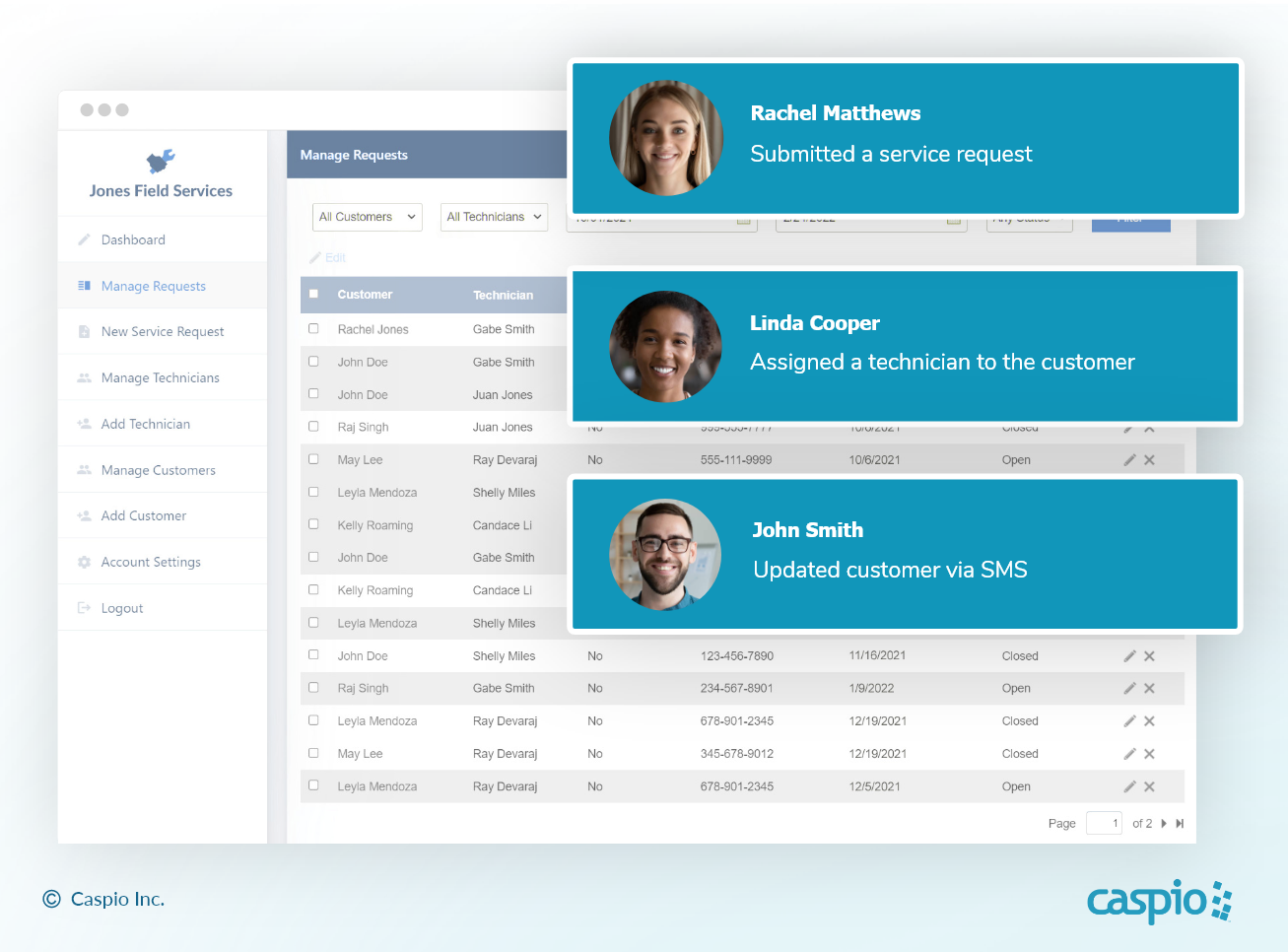
AUTOMATE WORK: Let your app send daily reports, clean data and take care of repetitive tasks while you focus on delivering business value.

Common Use Cases

Using Triggered Actions and Tasks in Caspio helps speed up your business processes. Here are some business logic ideas you can implement to fit your application needs:

1. Order Management

Use Triggered Actions to update order status for real-time monitoring. You can display the latest information on your report interface and send an email to specific users. Then trigger another automation when users provide feedback about their order using your custom application.

2. Activity and Performance Reports

Tasks are one of the best ways to automate your monthly, quarterly or annual reports. Send email notifications at specific times so various stakeholders can access role-based reports from your applications.

3. Recruitment

Need help facilitating the entire recruitment process? Set up automated notifications, acknowledgments and database updates with Triggered Actions to help HR recruiters create seamless applicant journeys.

4. Customer Reminders

Instead of manually sending emails to remind your users to make a payment, use automated Tasks. Configure your Tasks based on your business requirements — whether monthly, weekly, daily or on demand.
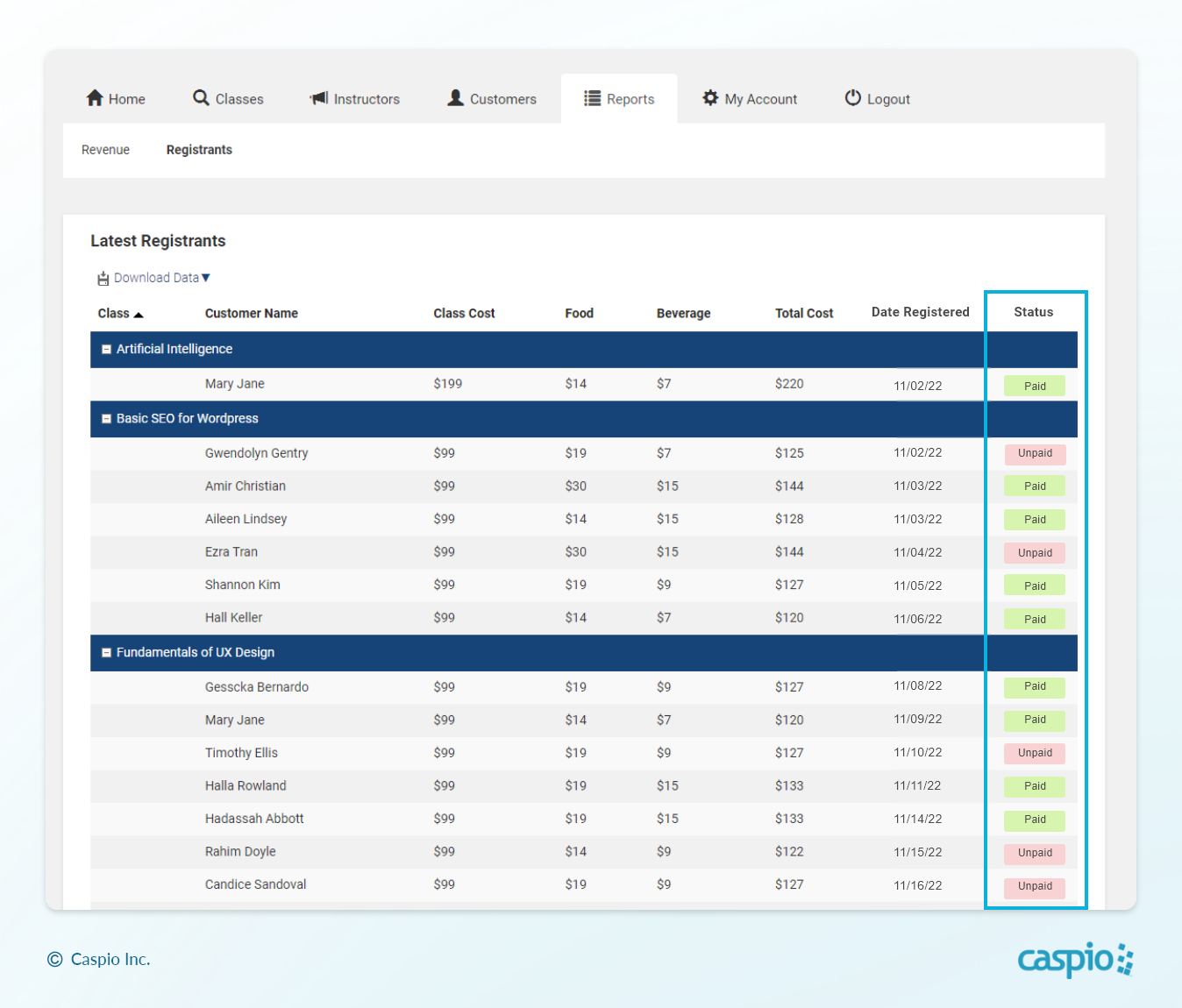
SECURE YOUR REVENUE: Use Triggered Actions and Tasks to automatically remind unpaid customers on your service application.

5. Event Management

Create a Task to send email or SMS messages to your registered participants, reminding them about their upcoming class or webinar. Set the schedule to one day or one hour before the event starts. Upon completing the event, you can send your participants a survey form using Triggered Actions.

Automate Your Workflows With Caspio

Want to speed up your workflows using your Caspio-powered applications? Learn more about it in our Caspio Live episode:

YouTube image 1

Subscribe to our YouTube channel for more weekly livestreams with interactive app-building and coaching sessions on popular topics.

Here are some previous episodes related to automation:

  • Popular Examples of Triggered Actions – Discover more use cases of Triggered Actions you can implement in your business workflows.
  • Automate Repetitive Actions With Tasks – Eliminate time-consuming operations such as sending out daily email reminders through Tasks.
  • Extend and Automate Your Caspio Apps With Zapier – Integrate your Caspio applications with popular third-party services using Zapier.

Ready to take back valuable time in your day? Schedule a free project consultation to explore how Caspio can help.

Project Consultation Project Consultation

Share this post:

Previous Post:
7 Surefire Ways to Uplevel Your Web Forms
Next Post:
Improve Security Across Your Apps With Caspio Directories

Recommended Articles

What Should a Custom CRM Include? The Complete Feature Checklist

10 Must-Have Features Every Custom CRM Should Include

READ STORY
Employee Portal Software for HR and Operations Teams

Modern Employee Portal Software for Enterprise

READ STORY
Member Portal Software for Associations and Organizations

How to Build a Member Portal Using Low Code

READ STORY
The Zoho Creator Alternative That Doesn’t Charge Per User

Best Zoho Creator Alternative Without Per-User Pricing

READ STORY
HIPAA Database Software: How to Choose a Compliant Platform for Healthcare Data

HIPAA Database Software: How to Choose a Compliant Platform

READ STORY
Enterprise Features at Mid-Market Prices: How Low-Code Changed the Game

Enterprise Features at Mid-Market Prices: How Low-Code Changed the Game

READ STORY
Caspio vs. Airtable: Which No-Code Platform Is Right for Your Business?

Caspio vs. Airtable: Which No-Code Platform Is Right for Your Business?

READ STORY
Custom CRM: How to Build a CRM That Fits Your Business Without Writing Code

Custom CRM: How to Build a CRM That Fits Your Business

READ STORY
How to Write Better AI Prompts in Caspio’s AI-Powered GPT Connect

How to Write Better AI Prompts in Caspio's AI-Powered GPT Connect

READ STORY
The 80/20 Modernization Strategy: How to Build Around Legacy Systems With Low Code

The 80/20 Modernization Strategy Using Low Code

READ STORY
Introducing the Caspio MCP Server: Ask Your Data Anything

Introducing the Caspio MCP Server

READ STORY
Why Citizen Developers Need Governance in Low-Code Platforms

Why Citizen Developers Need Governance in Low-Code Platforms

READ STORY
Subscribe for More Updates
  • PRODUCT

  • Platform Overview
  • What Is Low Code?
  • Case Studies
  • Marketplace
  • Pricing
  • Get a Custom Demo
  • Free Trial
  • SOLUTIONS

  • Healthcare
  • Education
  • Government
  • Financial Services
  • Energy and Utilities
  • Nonprofits
  • Media
  • Consulting
  • RESOURCES

  • Resource Center
  • Caspio Academy
  • Online Help
  • Onboarding
  • Get Certified
  • Professional Services
  • Managed Application Services
  • Support Center
  • Legal Center
  • COMPANY

  • Our Story
  • Careers
  • Leadership
  • News
  • Partner Programs
  • Referral Program
  • Academic Program
  • Discount Programs
  • Contact Us
  • TRENDING

  • HIPAA Compliance
  • SOC 2 Type 2 Compliance
  • FERPA Compliance
  • Build Custom CRM
  • Create Web Dashboards
  • Best Online Database
  • Build a Mini CRM SaaS in 1 Hour
  • Go Paperless With Web Forms
  • Launch Patient Portal
Caspio Logo

Caspio is the world’s leading cloud platform for building online database applications without coding.
Start a free trial today and experience the power of no-code.

Footer Partners

© 2026 Caspio, Inc. Sunnyvale, California. All rights reserved.

  • Privacy Statement
  • Terms of Use
  • Report Abuse
  • Sitemap
  • Feedback